PC · Steam & Battle.net

MW4 Cheats Modern Warfare 4 Aimbot, ESP & Radar

MW4 cheat software with soft aim, player ESP, wallhack, 2D radar, triggerbot, and separate 6v6 / DMZ configs—Cloud DMA unlocks the full module list on supported PC builds.

Optional

Stream-safe mode

Ricochet

Patch focus

PC

Platform

Discord

Support

ESP Active
Radar Online
Season Build
Undetected
Soft Aim Ready
No Recoil
Stream Proof
Player ESP
Skeleton ESP
UAV Radar
2D Radar
24/7 Support
Instant Delivery
Ranked Safe
Trigger Bot
Bone Select
Live Status
Auto Updates
Windows 10 & 11
Steam & Battle.net
MW4 PC client
Auto updater
Config cloud sync
Discord support
HWID reset
External loader

Features

Everything you need in one package

Awareness overlays, aim tuning, and utility tools for Call of Duty: Modern Warfare 4 on PC—updated when title and anti-cheat builds change.

Aim & recoil

Readable gunfights.

Configurable aim subsets and recoil helpers with smoothing—start conservative in the portal before tightening curves for ranked or CDL-style playlists.

  • Humanized delay and smoothing sliders
  • Weapon-class profiles for AR, SMG, and sniper
  • FOV and distance caps to reduce obvious snaps
ESP / awareness

See threats before they trade.

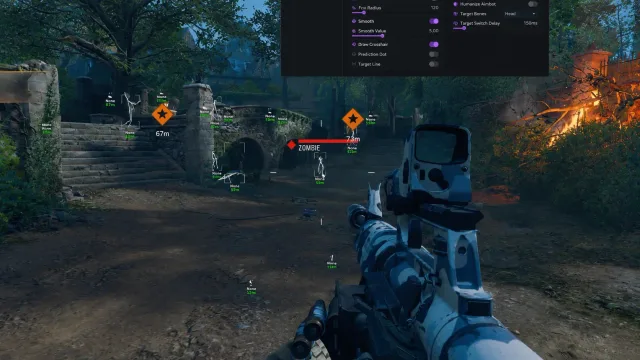
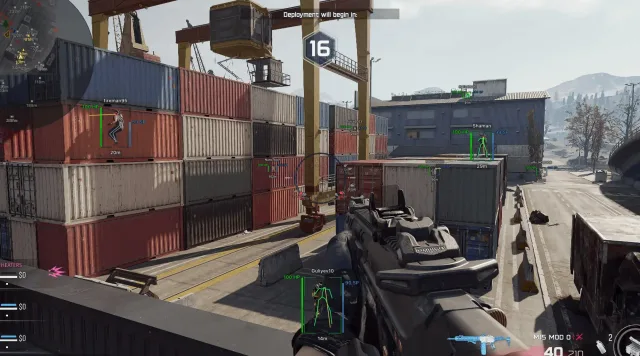
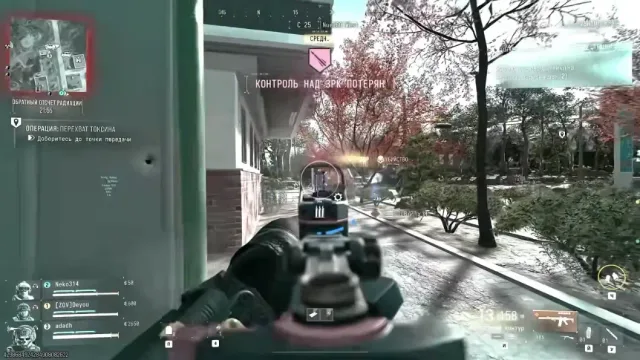
Player ESP, skeleton options, and distance readouts designed to stay readable when multiple operators contest one lane or building.

  • Team filters and max distance caps
  • Player and weapon highlights
  • Killstreak and vehicle cues where enabled

Radar & map

Minimap that matches your playstyle.

2D radar and minimap-style overlays so you can rotate with your squad instead of guessing flank timing.

  • Resize and opacity controls
  • Teammate and threat separation
  • Pairs with private match testing

Trigger & targeting

Decide who dies next.

Target prioritization and trigger-style options—tune separately from aim so you can disable layers in small maps.

  • ADS vs hip-fire modes
  • Visibility checks where supported
  • Safe defaults in portal presets

Utility suite

Cosmetics and extras.

Skin Changer preview, stat overlays, and Elite-only extras—use only modules you need so the stack stays maintainable after patches.

  • Skin Changer: local blueprint preview
  • Elite: expanded filters and priority support
  • Stream-proof toggles for capture software

Playlist presets

Ranked vs casual configs.

Separate cloud presets for aggressive respawn playlists and slower Search and Destroy—swap in the portal without rebuilding from zero.

  • Named slots for ranked and casual
  • Import/export from Discord staff
  • Patch notes tied to preset versions

Stream proof

Creators stay clean on stream.

Hide overlays from OBS, Game Bar, and common capture paths while you keep markers on your monitor.

  • Per-module stream toggles
  • Record a local test clip before going live
  • Linked steps in our overlay guide

Cloud config & updates

Patch-day discipline.

Loader builds and presets track MW4 title updates and Ricochet changes—check Discord #status when the banner flips to testing.

  • Cloud backup for profiles
  • Auto updater in the portal
  • Human support when hashes break

Products

MW4 products & utilities

MW4 cheats (Lite, Pro, Elite) plus HWID spoofer, UGC appeals, and Skin Changer preview.

Why us

Ranked tooling backed by patches—not promises

Most cheat shops ship stale loaders and anonymous tickets. We built cheatsmw4.org around post-patch verification, humanized tuning, and operators who actually play MW4 on PC.

  • Patch-day loader updates

    Ricochet-aware builds pushed after MW4 and anti-cheat updates—confirm Discord #status before you queue ranked.

    CheatsMW4
    Typical provider
  • Humanized tuning

    Smoothing, FOV caps, and distance limits mimic skilled PC aim—not instant snap patterns that spike reports.

    CheatsMW4
    Typical provider
  • Live Discord operators

    Real staff for loader install, playlist presets, and HWID recovery—not copy-paste bots.

    CheatsMW4
    Typical provider
  • External loader architecture

    Overlay-first workflow designed around MW4 on PC; avoid injecting random DLLs from untrusted pastes.

    CheatsMW4
    Typical provider
  • Cloud preset sync

    Ranked, casual, and private-match configs backed up to the portal—same sliders on any rig you own.

    CheatsMW4
    Typical provider
  • Hardware & appeal tools

    HWID Spoofer and UGC appeal workspace for documented recovery paths—read limitations before buying.

    CheatsMW4
    Typical provider

<24h

Patch turnaround

Target window to ship a new loader after major Ricochet or title drops—confirm live status first.

24/7

Operator coverage

Discord shifts for setup tickets during peak regions.

PC

Primary platform

Windows builds for Steam and Battle.net MW4 clients—macOS and console are out of scope.

Setup guide

From checkout to multiplayer in just three simple steps

Follow the operator portal: verify status on cheatsmw4.org, download the loader, load a conservative preset, then test in a private match before ranked.

  1. Unlock portal & download loader

  2. Import a conservative preset

  3. Verify status & launch MW4

How it works

From status check to saved profile.

Purchase through our partner checkout, then keep configs synced from the operator portal.

4 easy steps

  1. 01

    Read live status

    Confirm cheatsmw4.org and Discord #status show online builds before checkout.

  2. 02

    Pick your tier

    Lite for ESP, Pro for aim stacks, Elite for full module access plus Skin Changer preview.

  3. 03

    Install & test

    Private match first—verify FPS, overlays, and capture behavior before ranked.

  4. 04

    Save cloud profiles

    Lock presets after a good session; note the date in case you roll back after patches.

Blog

Guides and updates

MW4 setup, Ricochet patch checks, loadouts, and tier comparisons for PC players.

Cheat client: what to verify before buying any MW4 loader, including stability, the module list, and how vendors handle Ricochet downtime.

MW4: input, FOV, and update cadence differences, and why these guides focus on PC Steam and Battle.net clients only now.

Campaign: approach encounters without spoiling story beats, then use the same habits when you jump back into multiplayer matches.

FAQ

Questions about this page

Answers tied to what you are reading—visit the FAQ page for every topic.